LLM Fine-Tuning on DGX Spark: Building a Reusable Training Pipeline
A colleague’s team recently got access to NVIDIA DGX Spark for LLM work, and I joined to help set up the infrastructure. Before anyone could start experimenting, we needed a reusable pipeline — something any collaborator could clone and run without debugging the environment from scratch. The goal wasn’t to fine-tune one model once. It was to build a template that handles everything from asset download to training to GPU profiling, portable across whoever uses the machine next.
That turned out to be harder than the actual ML. The DGX Spark uses an ARM-based Grace Blackwell chip (aarch64), not x86_64. That single difference broke assumptions about Python packaging, Docker workflows, and GPU tooling that hold on every other machine I’ve worked with. Eleven distinct issues came up before the pipeline was solid. This post documents the architecture of the solution, the problems it had to survive, and the design decisions behind it.
The Hardware
The NVIDIA DGX Spark is a desktop AI workstation built on the Grace Blackwell GB10 chip:
| Spec | Value |
|---|---|
| Architecture | aarch64 (ARM64) |
| GPU compute capability | sm_121 (Blackwell) |
| Memory | 128 GB unified (shared CPU/GPU) |
| CUDA | 13.1 (driver 590.44.01, forward compatibility mode) |
| Host OS | Debian 12 |
The unified memory is the headline feature — CPU and GPU share the same physical memory pool, so a model that would need multi-GPU setups on discrete hardware fits in a single device. But the ARM architecture is where the trouble starts.
The Pipeline
The deliverable is a single repository that any team member can clone onto the DGX Spark and run — no manual environment setup, no tribal knowledge required. It covers the full workflow: asset download, containerized training with LoRA, GPU profiling, and inference from the trained adapter.
1
2
3
4
5
6
7
8
llm-ft/
├── Dockerfile              # NGC-based container
├── pyproject.toml           # Dependencies
├── prefetch.py              # Pre-download HF assets (self-bootstrapping)
├── train_lora.py            # Training script (HuggingFace Trainer)
├── train_lora_lightning.py  # Training script (Lightning Trainer)
├── generate.py              # Inference with trained adapter
└── profile_nsys.sh          # Nsight Systems profiling wrapper
The default configuration fine-tunes Qwen2.5-1.5B-Instruct on the Databricks Dolly-15k dataset using LoRA — 18.5M trainable parameters (1.18% of the 1.6B total), producing a ~70 MB adapter. But the pipeline is model- and dataset-agnostic: swap --model and --dataset to fine-tune a different model on different data. A quick validation run on 200 samples finishes in 26 seconds; a full 3-epoch run on 15K samples takes significantly longer.
The Two-Machine Workflow
The DGX Spark has no display — all work is via SSH. I developed on a local Linux machine (x86_64) and deployed to the Spark (aarch64):
 The edit-push-train-visualize loop between the local machine and the DGX Spark.
This is typical for headless GPU servers. Results are copied back for visualization. The iteration cycle is: edit locally, push, pull on the Spark, rebuild the container, test.
Why Docker
The host has Python 3.12 but no PyTorch — and on aarch64, there are no CUDA wheels on PyPI. You can’t just pip install torch. The NGC container provides PyTorch 2.10.0 pre-built with CUDA 13.0 and sm_121 support, plus Nsight Systems, cuDNN, cuBLAS, and NCCL. It doesn’t include the HuggingFace ecosystem (transformers, peft, datasets, accelerate), so the Dockerfile adds those on top.
The Dockerfile That Took Four Tries
Here’s the final version — 14 lines:
1
2
3
4
5
6
7
8
9
10
FROM nvcr.io/nvidia/pytorch:25.12-py3
WORKDIR /workspace
COPY pyproject.toml ./
RUN pip install --no-cache-dir transformers peft datasets accelerate \
      pytorch-lightning tensorboard && \
    pip install --no-cache-dir bitsandbytes || true && \
    pip uninstall -y torchao || true
COPY train_lora.py train_lora_lightning.py generate.py \
     profile_nsys.sh preflight.sh ./
CMD ["bash"]
It looks simple. It wasn’t. The Dockerfile went through four revisions, each fixing one issue and exposing the next.
What Broke (and Why)
Eleven things went wrong between git clone and a successful training run. Rather than listing them chronologically, I’ll group them by theme — the underlying concepts matter more than the order I hit them.
Docker: Bind Mounts Are Replacements, Not Merges
The symptom: ModuleNotFoundError: No module named 'peft' — despite the Dockerfile installing it during build.
The first Dockerfile used uv sync to install dependencies into /workspace/.venv. Then docker run used -v $(pwd):/workspace to bind-mount the project directory. The bind mount completely replaced /workspace, including the .venv with all installed packages.
1
2
3
4
5
During docker build:
  /workspace/.venv/  ← created with all deps installed

During docker run -v $(pwd):/workspace:
  /workspace/.venv/  ← GONE, shadowed by host mount
This is fundamental Docker behavior. A bind mount doesn’t merge with the image layer — it replaces the target directory entirely. Every file the build step put there is hidden behind the host directory.
The fix: Stop installing into a path that gets mounted. The final Dockerfile installs directly into the system Python with pip, putting packages in /usr/local/lib/python3.12/dist-packages/ — safely outside any bind mount.
The rule: Never install build artifacts into a directory that will be bind-mounted at runtime.
Package Manager vs. Container: Why uv Failed Inside NGC
I use uv for everything on my local machine. Inside the NGC container on aarch64, it hit a cascade of failures:
1. SSL/TLS certificate errors.
1
2
error: Failed to fetch: https://pypi.nvidia.com/nvidia-cuda-runtime/...
  Caused by: invalid peer certificate: UnknownIssuer
uv uses rustls, a Rust-based TLS implementation with its own compiled-in certificate store. Inside NGC containers, the NVIDIA package indexes aren’t trusted by rustls. pip uses OpenSSL, which reads the container’s system CA certificates and works fine.
| TLS Backend | Used By | Behavior in NGC |
|---|---|---|
| rustls | uv (default) | Fails — doesn’t trust NVIDIA’s cert chain |
| OpenSSL | pip, curl | Works — NGC has proper system CA certs |
2. No aarch64 PyTorch wheels on PyPI.
uv tries to resolve torch from PyPI. On aarch64, there are no CUDA wheels — the only way to get PyTorch is through the NGC container’s pre-built installation or building from source. uv doesn’t know about the system-installed torch and tries to download it, fails, and blocks the entire resolution.
3. Python version mismatch.
The project had a .python-version file specifying Python 3.11. When uv sync ran during docker build, it installed Python 3.11 into a venv. But NGC’s PyTorch is built for the container’s Python 3.12. The result: python works, pip show torch shows torch is installed, but import torch fails silently because the running Python (3.11) can’t see packages installed for Python 3.12.
1
2
/opt/venv/bin/python       → Python 3.11  (from uv)
/usr/local/lib/python3.12/ → where torch lives  (from NGC)
This is the most insidious class of bug — everything looks correct until import fails.
The decision: Stop fighting uv’s design assumptions inside NGC. Use pip, which installs into the current Python’s site-packages, uses OpenSSL for TLS, and doesn’t try to resolve packages that are already system-installed.
uv is still the right choice for local development (x86_64, standard PyPI wheels). But NGC containers are a different environment with pre-installed system packages and custom certificate chains — pip fits better.
NGC Container Conflicts: torchao and torch_dtype
torchao version incompatibility:
1
2
ImportError: Found an incompatible version of torchao. Found version 0.15.0,
but only versions above 0.16.0 are supported
The NGC 25.12 container ships torchao==0.15.0 (NVIDIA-patched). The latest peft requires >=0.16.0 and version-checks it eagerly at import time, even when you’re not using any torchao features. The fix: uninstall it.
1
pip uninstall -y torchao || true
Deprecated torch_dtype parameter:
Recent HuggingFace Transformers renamed torch_dtype to dtype in from_pretrained(). A one-line rename, but the kind of thing that breaks when you pin NGC’s container version and install the latest transformers on top.
Both of these are symptoms of the same pattern: NGC containers are curated environments with specific package versions pinned for stability. Community packages (peft, transformers) evolve faster than NGC releases. When layering community packages on NGC, be prepared to remove or patch conflicting NGC-bundled packages.
Permissions and Access
PEP 668: Externally Managed Environment.
1
2
3
$ pip install datasets
error: externally-managed-environment
× This environment is externally managed
Debian 12 implements PEP 668, which blocks pip install into the system Python to protect OS packages. Even pip install --user is blocked. Without sudo, the only option is creating a virtual environment:
1
subprocess.check_call([sys.executable, "-m", "venv", VENV_DIR])
This is exactly what prefetch.py’s self-bootstrapping mechanism does — it creates /tmp/hf-prefetch-venv, installs its dependencies there, then os.execv’s itself into the venv’s Python. The user just runs python3 prefetch.py and it handles everything.
Root-owned files from Docker.
Docker containers run as root by default. When the container writes files to a bind-mounted directory, those files are owned by root:root on the host. Without sudo, you can’t delete them.
1
2
$ rm -rf .hf_cache
rm: cannot remove '...': Permission denied
The fix: use Docker itself for cleanup.
1
docker run --rm -v $(pwd):/workspace busybox rm -rf /workspace/.hf_cache
The prevention: pre-download HuggingFace assets on the host (as the current user) before any container runs. The container only reads from the cache, never writes.
HuggingFace downloads stuck inside the container.
Model weight downloads (3 GB) hung at 0% inside the container — likely due to rate limiting on unauthenticated requests and container network stack issues. The prefetch.py script solves this by downloading everything on the host where the network stack is simpler and downloads are reliable, then bind-mounting the cache into the container.
bitsandbytes on CUDA 13.1
1
2
bitsandbytes library load error: Configured CUDA binary not found at
.../libbitsandbytes_cuda131.so
bitsandbytes ships pre-compiled binaries for specific CUDA versions but doesn’t have one for CUDA 13.1 on aarch64. This only affects 4-bit quantization (--load_in_4bit). Standard bf16 LoRA training works fine without it. The Dockerfile handles it gracefully:
1
pip install --no-cache-dir bitsandbytes || true
The Training Pipeline
With the environment working, the actual training code is straightforward.
Data Flow
1
2
3
4
5
6
7
load_dataset("databricks/databricks-dolly-15k")
    → 15,011 instruction/context/response rows
    → optional subsampling (--max_samples 200)
    → train_test_split (90/10)
    → format_example() applies Qwen chat template
    → tokenizer() with truncation at max_length (512)
    → DataCollatorForLanguageModeling(mlm=False)
The format_example() function converts raw instruction/response pairs into the model’s native chat format:
1
2
3
4
<|im_start|>user
Explain what DNA is<|im_end|>
<|im_start|>assistant
DNA (deoxyribonucleic acid) is a molecule that carries...<|im_end|>
Training on the model’s chat template — rather than a generic text format — produces much better instruction-following behavior.
LoRA Configuration
1
2
3
4
5
6
7
8
LoraConfig(
    r=16,                        # rank
    lora_alpha=32,               # scaling factor (alpha/r = 2.0)
    lora_dropout=0.05,
    target_modules="all-linear", # all linear layers, not just attention
    bias="none",
    task_type="CAUSAL_LM",
)
Applying LoRA to all linear layers (attention Q/K/V/O + MLP projections) is current best practice — it gives better quality than targeting attention layers alone, with a modest parameter increase. The result: 18.5M trainable parameters out of 1.6B total (1.18%).
Training Arguments
1
2
3
4
5
6
7
8
9
10
11
12
TrainingArguments(
    num_train_epochs=3,
    per_device_train_batch_size=4,
    gradient_accumulation_steps=4,   # effective batch size = 16
    learning_rate=2e-4,
    lr_scheduler_type="cosine",
    warmup_steps=10,
    bf16=True,
    eval_strategy="epoch",
    save_strategy="epoch",
    load_best_model_at_end=True,
)
The quick validation run (200 samples, 1 epoch) finishes in ~26 seconds with a train loss of 2.2 dropping to eval loss of 1.6 — the model learns the instruction format quickly.
GPU Profiling Setup
The repo includes two profiling integrations, each capturing different information:
torch.profiler via ProfilerCallback
A custom TrainerCallback wraps torch.profiler.profile() around the training loop:
1
2
3
4
5
6
schedule=torch.profiler.schedule(
    wait=1,     # skip first step (cold start)
    warmup=1,   # warm up caches
    active=3,   # record 3 steps
    repeat=1,
)
This skips the first step (which includes JIT compilation and memory allocation overhead), warms up for one step, then records three steady-state steps. Output goes to TensorBoard-compatible trace files and a terminal table of top 20 CUDA operators.
Nsight Systems via NsysCallback
A lightweight callback emits NVTX markers that Nsight Systems correlates with GPU kernel execution:
1
2
3
4
5
class NsysCallback(TrainerCallback):
    def on_step_begin(self, ...):
        torch.cuda.nvtx.range_push(f"step_{state.global_step}")
    def on_step_end(self, ...):
        torch.cuda.nvtx.range_pop()
The profile_nsys.sh wrapper runs nsys profile with trace sources for CUDA, NVTX, cuDNN, and cuBLAS. Overhead is minimal (~1-2%) compared to torch.profiler (~5-15%).
1
2
3
4
nsys profile \
    -t cuda,nvtx,osrt,cudnn,cublas \
    -s none \
    python train_lora.py --profile_nsys --max_samples 200 --epochs 1
Both produce output in profiler_logs/ — TensorBoard JSON traces from torch.profiler, .nsys-rep binary traces from Nsight Systems. Results are copied back to the local machine with scp for visualization.
For a deep dive into what the profiling traces actually reveal, see the companion post: GPU Profiling for LLM Fine-Tuning on DGX Spark: What the Traces Reveal.
The Final Workflow
After resolving all eleven issues, the end-to-end workflow is clean. Here it is running on the DGX Spark:
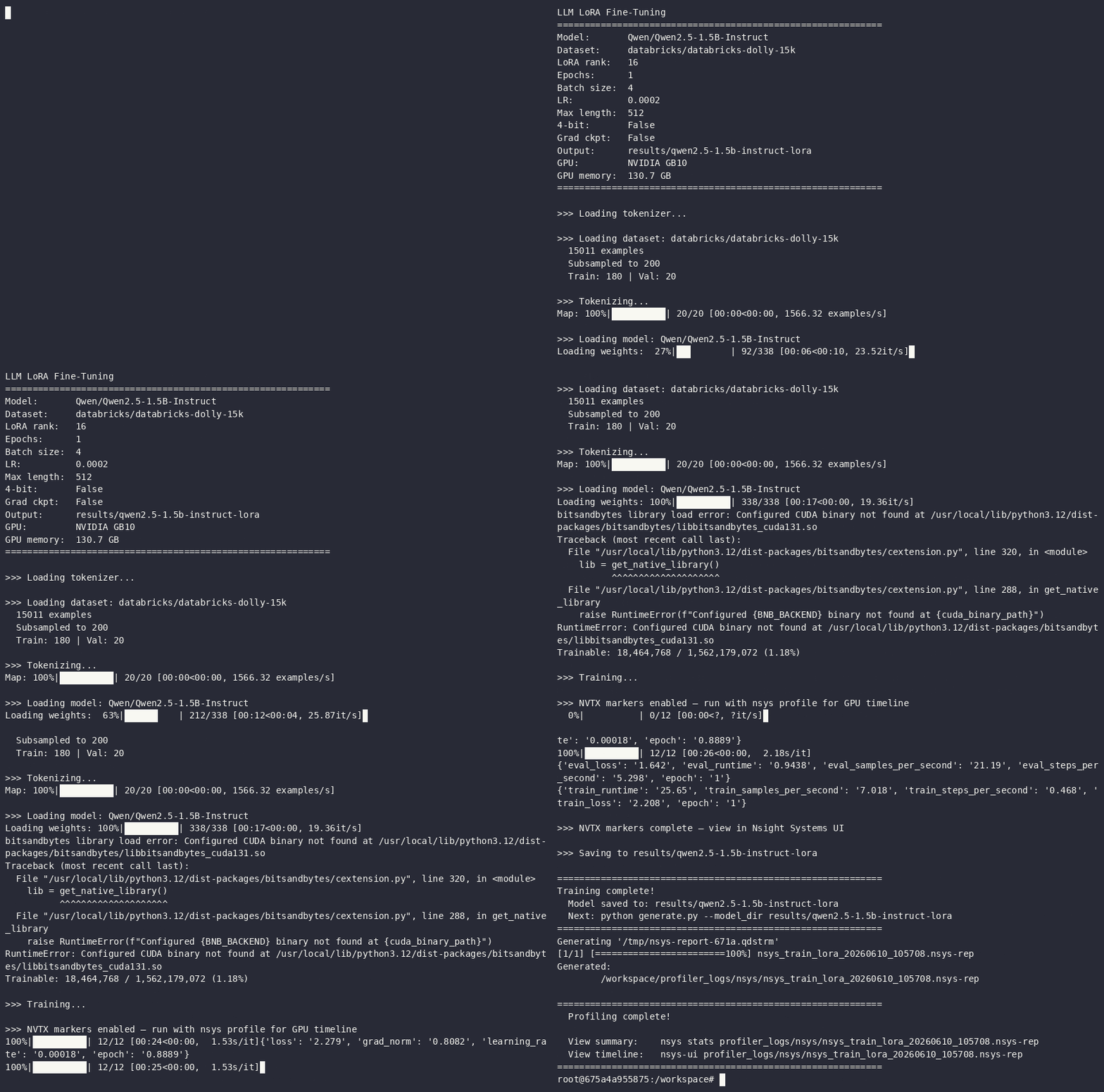 The pipeline in action: container startup, training run, and profiling output on the DGX Spark.
1
2
3
4
5
6
7
8
9
10
11
12
13
14
15
16
17
18
19
20
21
22
23
24
25
# 1. Clone
git clone https://github.com/pengguanya/llm-ft.git && cd llm-ft

# 2. Build container (~3-5 min)
docker build -t llm-ft .

# 3. Pre-download HF assets (self-bootstrapping, no setup needed)
python3 prefetch.py

# 4. Run container
docker run -it --gpus all --ipc=host \
  -v $(pwd):/workspace -w /workspace \
  -v $(pwd)/.hf_cache:/root/.cache/huggingface \
  llm-ft

# 5. Inside the container:
python train_lora.py --verify                              # verify setup
python train_lora.py --max_samples 200 --epochs 1          # quick test
python train_lora.py                                       # full training
python train_lora.py --profile --max_samples 200 --epochs 1  # torch.profiler
bash profile_nsys.sh                                       # Nsight Systems

# 6. Inference
python generate.py --model_dir results/qwen2.5-1.5b-instruct-lora \
  --prompt "Explain what DNA is in one sentence."
The docker run flags:
| Flag | Why |
|---|---|
--gpus all | Expose GPU via NVIDIA Container Toolkit |
--ipc=host | Shared memory for PyTorch DataLoader multiprocessing |
-v $(pwd):/workspace | Bind mount project directory (edits persist after exit) |
-v $(pwd)/.hf_cache:/root/.cache/huggingface | Mount pre-downloaded model/dataset cache |
DGX Spark Is Not a Smaller Cluster — It’s a Different Environment
If you’ve worked with HPC clusters or multi-node GPU setups, the DGX Spark looks deceptively familiar. Same NVIDIA branding, same NGC containers, same PyTorch. But the Spark’s Grace Blackwell GB10 is an ARM-based desktop workstation with unified memory — not a scaled-down data center node. The tooling assumptions that hold on x86_64 clusters break here in specific, predictable ways.
aarch64 means a different package ecosystem. There are no PyTorch CUDA wheels on PyPI for ARM. Tools like uv that resolve everything from PyPI hit a wall. The NGC container’s pre-built PyTorch is the only practical path — which means your Dockerfile strategy must work with the container’s system Python, not replace it.
NGC containers are curated, not blank. They ship specific package versions pinned for stability. Layering the latest community packages (peft, transformers) on top will surface version conflicts with bundled packages (torchao, bitsandbytes). Be ready to remove what you don’t need rather than trying to upgrade it.
pip over uv inside containers. uv’s Rust-based TLS backend doesn’t trust NGC’s certificate chain, and its automatic Python version management fights the container’s system Python. pip uses OpenSSL, installs into the current Python, and doesn’t try to resolve packages that are already system-installed. Match the tool to the environment.
Pre-download everything on the host. HuggingFace downloads stall inside containers. The prefetch.py self-bootstrapping pattern — create a venv, install deps, os.execv back into itself — works with zero prerequisites beyond python3 and keeps the container’s runtime deterministic.
Expect Docker permission friction. Containers run as root; bind-mounted files end up root-owned on the host. Pre-download on the host so the container only reads. When you need cleanup: docker run --rm -v ... busybox rm -rf /path.
Keep Dockerfiles small. Each debugging cycle required a rebuild. A 14-line Dockerfile rebuilds in ~2 minutes.
The Dockerfile went through four revisions — from uv sync into a shadowed venv, to SSL workarounds, to native TLS with version pinning, to finally just pip install into the system Python. Each version fixed one problem and revealed the next. The final version is simple because it stopped imposing local-development patterns onto an environment with its own rules.
The point of all this wasn’t to get one training run to work. It was to build a template that other Spark users and collaborators can pick up without re-discovering these problems. The repo is self-contained: clone it, run prefetch.py, build the container, train. Every issue documented here is already handled in the Dockerfile, the scripts, or the workflow. Five commands, not eleven debugging sessions.