What Two Bugs Taught Me About AI Agentic Harnesses
I’d been running my AI-powered exercise generation system for weeks. It produced worksheets, rendered them to PDF, evaluated photographed handwritten answers, tracked scores, and adapted difficulty — all orchestrated through Claude Code skills. The architecture was sound. The workflow was smooth. The output looked professional.
Then I noticed something: the student was getting 100% on verb conjugation exercises without actually learning verb conjugation.
Every single worksheet, across every batch, asked the same thing: third-person singular. “er rennt → ?”, “sie denkt → ?”, “er gibt → ?”. The student had learned to conjugate exactly one form. When a practice exam asked “wir sitzen → ?” — first-person plural — it was a blank stare.
The AI had been generating grammatically perfect, pedagogically useless exercises for weeks. And I hadn’t caught it because the system was working exactly as designed.
What an Agentic Harness Is (and Isn’t)
Before I get into what went wrong, some context on what I mean by “agentic harness.”
Most people use LLMs as chat. You ask a question, you get an answer. An agentic harness is the structure you put around the AI to make it do sustained, multi-step work: generating content in a specific format, persisting state between sessions, following a workflow with human checkpoints, and feeding its own output back into future inputs.
In my case, the harness is a set of Claude Code skills — markdown files that define reusable agent workflows invoked via slash commands. One skill generates exam prep worksheets. Another evaluates photographed answers. A third routes incoming photos to the right worksheet. They share Python libraries for deterministic operations: PDF rendering, atomic progress updates, email delivery.
The skill file is the harness. It’s a 650-line markdown specification that tells Claude what to read, what to generate, what format to use, and where to stop and wait for human approval. It’s not a prompt — it’s an operating manual that the AI loads every time the skill runs.
The harness was working. The exercises were well-formatted, the PDFs rendered cleanly, the evaluation scores were accurate, the progress tracking was atomic and reliable. The problem was upstream of all that infrastructure. The problem was in what the AI chose to generate when given freedom within the specification.
Bug 1: The Conjugation Trap
Here’s the verb conjugation exercise the system was producing, batch after batch:
1
2
3
4
5
1. er rennt    → ___________
2. sie ruft    → ___________
3. er denkt    → ___________
4. sie gibt    → ___________
5. er sitzt    → ___________
Five verbs, all third-person singular. Sometimes er, sometimes sie, but always the same grammatical person. The answers were always correct. The format was always clean. The difficulty progression was appropriate. Everything looked right.
But German verb conjugation has six person forms:
| Person | Singular | Plural |
|---|---|---|
| 1st | ich renne | wir rennen |
| 2nd | du rennst | ihr rennt |
| 3rd | er/sie rennt | sie rennen |
The student needs to handle all six. On the real exam, questions mix persons deliberately. An exercise that only tests one form teaches pattern matching, not conjugation.
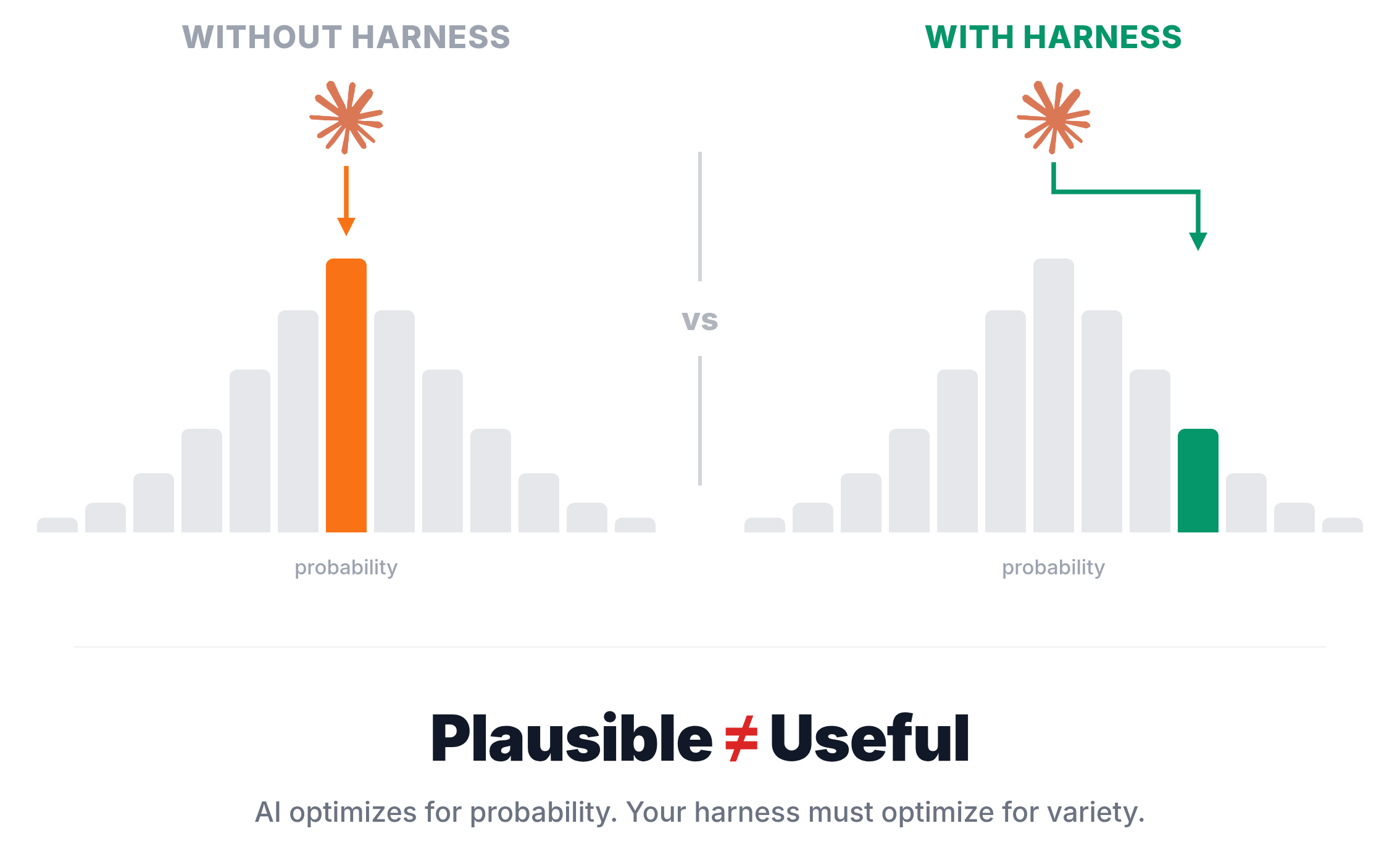
Why did the AI do this? Because third-person singular is the most common verb form in training data. It’s the citation form. It’s what textbooks use for examples. It’s the most plausible choice for a verb conjugation exercise. The AI wasn’t wrong — it was following the path of highest probability, which happened to be the least pedagogically useful path.
The skill specification said:
For
zeitformen: useverb_presentfield with plain text like"er rennt"
That example — "er rennt" — became the template. The AI generalized from a single example and reproduced its pattern across every worksheet. Not because it couldn’t generate other forms, but because nothing in the specification told it to.
Bug 2: The Alphabetical Tell
The second bug was subtler. Vocabulary matching exercises ask the student to match words to their definitions:
1
2
3
4
5
6
7
8
A = suspicious       B = flawless       C = quickly
D = unease           E = persistent

1. makellos (flawless)     → ___
2. zügig (quickly)         → ___
3. argwöhnisch (suspicious) → ___
4. Unbehagen (unease)      → ___
5. beharrlich (persistent)  → ___
The correct answers, in order: B, C, A, D, E.
Except they weren’t. Across every worksheet I checked, the answers were always A, B, C, D, E — in order. The first word always matched definition A. The second always matched B. Every time.
The student had figured this out. Instead of reading each definition and matching it to the word, they just wrote A through E in order. Five correct answers, zero learning.
Why did the AI do this? Same root cause. Alphabetical ordering is the most natural way to present a list. When the AI generated the word-to-definition mapping, it constructed the options list in the same order as the questions. Not maliciously, not lazily — just following the path of least surprise. The JSON structure made it easy: generate words, generate definitions in the same order, assign letters sequentially.
The Fix Is Not Better Prompting
My first instinct was to add a line to the generation prompt: “Make sure to vary the person forms” or “Shuffle the answer order.” This is what most prompt engineering advice suggests — add more instructions, be more specific.
But prompt instructions are suggestions. They work when the AI is paying attention to them, which is most of the time. They fail at the margins — when the model is generating the fifth worksheet in a batch and the instruction has scrolled past the attention window, or when the model’s strongest prior (third-person singular, alphabetical order) overpowers a gentle instruction to vary.
What I needed was specification, not suggestion. The fix was adding explicit constraints to the skill file — the 650-line markdown document that Claude loads every time the skill runs:
1
2
3
4
5
6
### Zeitformen: Cover All Person Forms

**CRITICAL**: Do NOT default to 3rd person singular only.
Each zeitformen exercise MUST mix different grammatical persons
across its questions. Within a single exercise (typically 3-6
verbs), distribute across at least 3 different person forms.
And for vocabulary:
1
2
3
4
5
6
7
8
9
### Wortschatz: Shuffle Answer Assignments

**CRITICAL**: The correct letter answers must NOT follow
alphabetical order (A, B, C, D, E). Shuffle the mapping
so the answers are in a random order.

Bad: answers are A, B, C, D, E (in order)
Bad: every worksheet uses the same shuffled order
Good: each worksheet in a batch has a different random order
Notice the structure of these constraints: they name the failure mode explicitly (“Do NOT default to…”), state the requirement positively (“MUST mix…”), and give examples of both bad and good output. This isn’t prompt engineering — it’s specification engineering. The constraints are part of the system’s operating manual, loaded fresh every session.
What These Bugs Reveal
These two bugs look like content issues — wrong person forms, wrong answer ordering. But they’re actually architectural issues. They reveal something fundamental about how AI behaves inside an agentic harness:
The AI optimizes for plausibility, not utility
The most plausible verb form is third-person singular. The most plausible list ordering is alphabetical. The AI’s training objective is to produce likely output, not useful output. In a chat context, this is fine — plausible answers are usually helpful answers. In a production system where the same operation runs repeatedly, plausibility becomes a rut. The AI converges on the most probable pattern and stays there.
Examples in specifications become templates
The original spec included "er rennt" as a field example. The AI treated it as a template, not an illustration. This is a known pattern in few-shot prompting, but it’s easy to forget when your “prompt” is a 650-line skill file. Every example you include is a magnet. If you show one person form, you get one person form. If you show all six, you get variety.
I updated the example in the specification from:
1
{"verb_present": "er rennt", "answer": "er rannte"}
To:
1
2
3
4
5
6
{"verb_present": "ich renne", "answer": "ich rannte"},
{"verb_present": "du rufst", "answer": "du riefst"},
{"verb_present": "sie denkt", "answer": "sie dachte"},
{"verb_present": "wir sitzen", "answer": "wir sassen"},
{"verb_present": "ihr gebt", "answer": "ihr gabt"},
{"verb_present": "sie fliegen", "answer": "sie flogen"}
Six person forms in the example. Now the AI’s strongest prior — imitate the example — works in my favor instead of against me.
Silent failures compound over weeks
In a one-shot interaction, a biased output is harmless. You read it, notice the issue, and ask for a revision. In a production harness that generates batches of worksheets week after week, the same bias repeats every time. Worse, the student adapts to the bias. They learn the pattern (always third-person, always alphabetical) and optimize for it. By the time you notice, weeks of practice have been spent building the wrong skills.
This is the fundamental risk of agentic systems: the feedback loop is slower than the production loop. The system generates content faster than a human reviews it for subtle pedagogical issues. Approval gates catch gross errors — wrong difficulty level, broken formatting, duplicate content. They don’t catch statistical biases in the AI’s creative choices.
The skill file is the product
In a traditional software system, the code is the product. In an agentic harness, the specification is the product. The skill file that tells the AI what to do, what not to do, and what good output looks like — that’s where the engineering happens. Fixing the conjugation bug wasn’t a code change. It was adding twelve lines of markdown to the skill specification. Fixing the answer ordering was eight lines.
This has a counterintuitive implication: improving an agentic system means writing better documentation. Not code, not tests, not infrastructure. The skill file is simultaneously the specification, the documentation, and the runtime instruction. Editing it changes behavior immediately, with no deployment step.
The Evaluate-Then-Design Loop
These bugs also changed how I approach batch design. Before, the workflow was: design exercises → generate → print → evaluate → track progress. After, it became: evaluate previous batch → identify patterns → update specification → design next batch.
The evaluation step now does double duty. It scores the student’s answers, but it also audits the exercises themselves. When I review a completed batch, I’m not just asking “did the student learn?” — I’m asking “did the exercises teach what they were supposed to teach?” If verb conjugation scores are high but only one person form was tested, that’s a system bug, not student mastery.
This is the closed loop that makes an agentic harness different from a prompt. The system’s output feeds back into the system’s specification. Each batch teaches me something about what the AI gets wrong, and that lesson becomes a permanent constraint in the skill file. The specification grows over time, accumulating lessons learned. It’s institutional memory embedded in the operating instructions.
Generalizable Lessons
If you’re building any system where AI generates content repeatedly — not once, but as a production workflow — these patterns apply:
Audit the output distribution, not individual outputs. Any single worksheet looked fine. The problem was only visible across the full batch. When your AI runs in a loop, review the aggregate, not just the latest item.
Treat specification examples as magnets. Every example you include in a skill file, system prompt, or few-shot prompt will attract the AI’s output toward its pattern. If you want variety, show variety. If you show one way to do something, that’s what you’ll get.
Separate creative constraints from workflow. My skill file mixes “how to generate a batch” (the workflow) with “what good exercises look like” (the constraints). The workflow rarely changes. The constraints evolve weekly as I discover new failure modes. They should be separate documents so the constraints can grow without cluttering the workflow logic.
Expect statistical bias, not random errors. AI failures in production systems are rarely random. They’re systematic — the same bias repeated across every output. Third-person singular every time. Alphabetical order every time. The fix is not retry logic or randomness. It’s explicit constraints that name the bias and forbid it.
The specification is a living document. The best agentic systems I’ve built aren’t the ones with the most sophisticated architectures. They’re the ones where the skill file has been edited thirty times, each edit a lesson learned from a previous batch. The skill file is the product. Everything else is infrastructure.