The Planning Phase Is Where AI Agents Earn Their Keep
I asked Claude Code to design a Neovim maintenance system — update scripts, upstream sync, cross-machine portability, the works. It explored my setup in parallel with three agents, drafted a comprehensive plan, and recommended Option A: add tools_general as a yadm submodule for automatic synchronization.
I didn’t accept it. Instead, I asked: “I want to hear your argument why you recommend the first approach against the second one.”
Claude paused, laid out the tradeoffs — and then reversed its own recommendation.
“Honestly, I’m revising my recommendation to Option B (bootstrap clone step). Here’s why…”
That moment — where the AI changed its mind under scrutiny — is the most valuable thing that happened in the entire session. Not the scripts it wrote. Not the skill it created. The planning conversation.
This post is about why the planning phase matters more than the implementation phase when working with AI agents on complex projects, and how to use critical questions to get better outcomes.
The Problem with Accepting the First Plan
When you give an AI agent a complex task, it will produce a plan. The plan will look reasonable. It will be well-structured, clearly written, and cover the obvious requirements. This is exactly the problem.
AI agents have a bias toward comprehensive-looking solutions. They tend to recommend approaches that sound thorough and cover many edge cases, even when a simpler approach would serve you better. The first plan is optimized for appearing complete, not for being the right fit for your specific situation.
In my case, the task was: design a portable, maintainable system for Neovim updates, upstream kickstart.nvim synchronization, and cross-machine bootstrapping — then encode it as a Claude Code skill so it can be executed reliably and repeatably.
Claude Code launched three exploration agents in parallel to understand my setup:
- One examined my Neovim config and yadm tracking
- One investigated yadm submodules and their coordination
- One checked the latest Neovim version and AppImage installation
After gathering context, it entered plan mode and designed a five-script system with a SKILL.md interface. The scripts themselves were well-designed. But the sync strategy — how to get everything to new machines — is where things got interesting.
The Initial Recommendation
Claude recommended adding ~/tools/general as a yadm submodule. The reasoning was sound on the surface:
- Yadm submodules provide automatic sync via
yadm submodule update --init --recursive - My Neovim config already uses this pattern (it’s a forked kickstart.nvim repo tracked as a yadm submodule)
- Consistency with existing infrastructure
This is the kind of recommendation that AI agents excel at: pattern-matching against your existing setup and suggesting more of the same. It noticed I already use yadm submodules and proposed extending the pattern. Logical. Defensible. And wrong for this specific case.
The Critical Question
I didn’t accept the recommendation. Instead of asking “sounds good, proceed,” I selected the multi-select option to ask about multiple concerns at once, and specifically typed in: “I want to hear your argument why you recommend the 1st approach against the 2nd one.”
 Instead of accepting the recommended option, I asked Claude to explicitly argue for its recommendation against the alternative. The highlighted text shows the custom input where I requested this justification.
This is a deliberate technique. I wasn’t asking Claude to explain its recommendation — that just produces more justification for an already-made decision. I was asking it to argue against the alternative, which forces it to think about what the alternative does better.
The Reversal
What happened next is the interesting part. Claude started writing out the argument for Option A, but as it enumerated the actual tradeoffs, it realized the alternative was stronger for my situation.
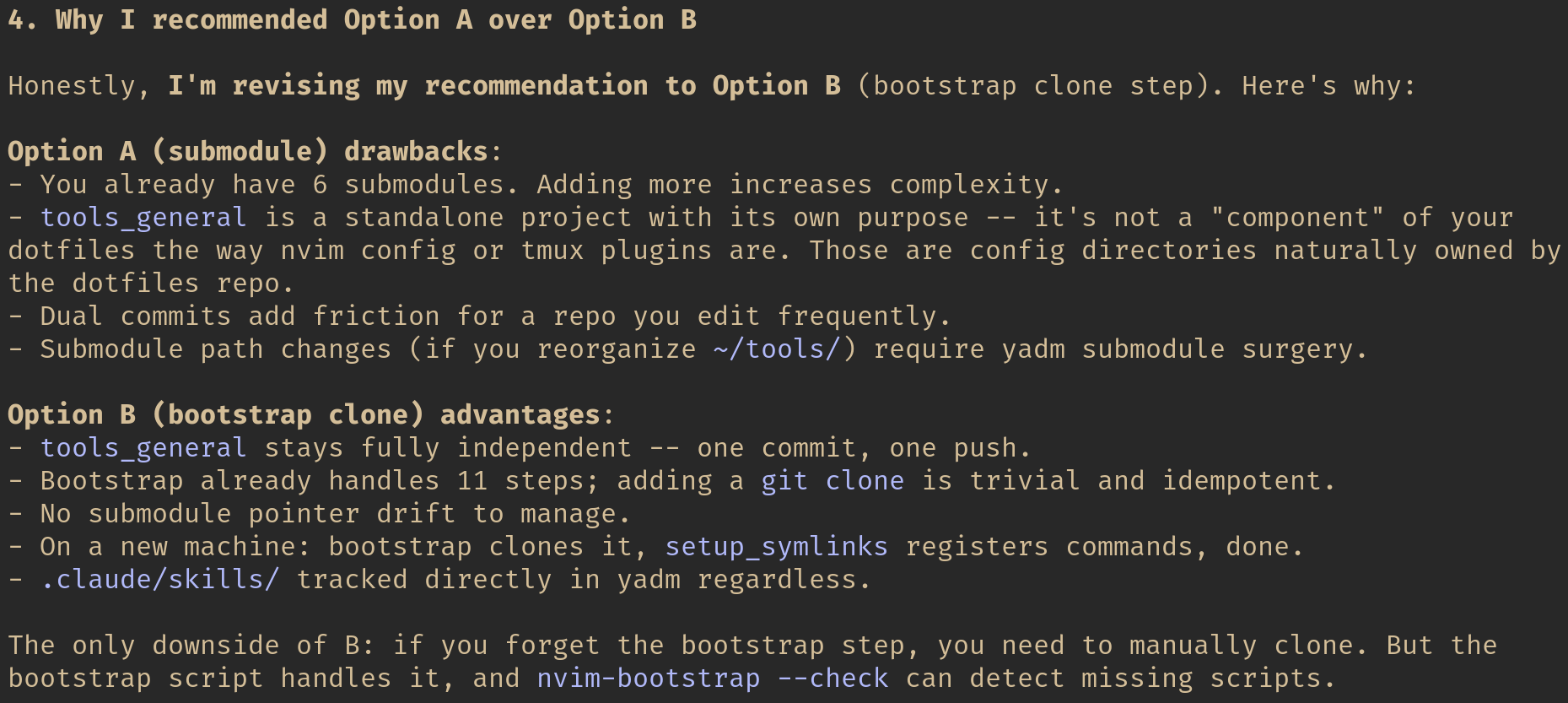 “Honestly, I’m revising my recommendation to Option B.” Claude lists concrete drawbacks of its original recommendation and advantages of the alternative it had initially ranked second.
Here is the core of its revised analysis:
Option A (submodule) drawbacks:
- I already have 6 submodules. Adding more increases complexity.
tools_generalis a standalone project with its own purpose — it’s not a “component” of dotfiles the way nvim config or tmux plugins are.- Dual commits add friction for a repo I edit frequently.
- Submodule path changes (if I reorganize
~/tools/) require yadm submodule surgery.
Option B (bootstrap clone step) advantages:
tools_generalstays fully independent — one commit, one push.- Bootstrap already handles 11 steps; adding a
git cloneis trivial and idempotent. - No submodule pointer drift to manage.
- On a new machine: bootstrap clones it,
setup_symlinksregisters commands, done.
The critical insight was the nature of the repository. Nvim config and tmux plugins are configuration that naturally belongs under dotfile management. tools_general is an independent project that happens to be used on every machine. These are categorically different things, and they should use different sync mechanisms.
Claude’s first recommendation missed this distinction because it was pattern-matching (you already use submodules, so use more submodules) rather than reasoning about the fundamental nature of each repository.
Why This Matters
This interaction illustrates something I’ve seen repeatedly when working with AI agents on complex projects: the planning phase is where the highest-leverage human intervention happens.
During implementation, the AI is mostly doing mechanical work — writing code, running tests, editing configs. You review the output, but the decisions are already made. During planning, the AI is making architectural choices that cascade through everything that follows. A wrong sync strategy means every future maintenance session is more friction than it needs to be.
The Planning Phase Anti-Pattern
Here is the workflow I see most people use with AI agents:
- Describe the task
- Accept the plan
- Watch it implement
- Review the output
- Iterate on bugs
This workflow puts human judgment at step 4, after the implementation is done. You’re reviewing code, not decisions. By the time you realize the architecture is wrong, you’ve burned context window, tokens, and time.
The Critical Question Workflow
Here is what I’ve found works better:
- Describe the task
- Read the plan critically
- Ask the AI to defend specific choices against alternatives
- Watch for reversals — they indicate the AI’s initial recommendation was shallow
- Approve the revised plan
- Let it implement
- Review the output (which is now much more likely to be right)
Steps 2–4 typically take 2–3 minutes. They save 20–30 minutes of rework.
Techniques for Productive Pushback
Through several complex projects with Claude Code, I’ve developed a few specific techniques for the planning phase:
1. Ask “Why This Over That?”
Don’t just ask “why did you choose X?” — that invites rationalization. Ask “why X instead of Y?” This forces comparative reasoning, which is where shallow recommendations fall apart.
In the Neovim example, asking “argue for Option A against Option B” immediately surfaced tradeoffs that Claude hadn’t weighed properly.
2. Question Pattern-Matching
When the AI says “you already use X, so let’s use more X,” ask whether the new use case is actually the same as the existing one. Pattern-matching is the AI’s strongest heuristic and its most common source of bad recommendations. Same tool, different context, wrong choice.
3. Ask About the Downside
For any recommendation, ask: “What’s the worst thing about this approach?” AI agents tend to lead with benefits. Making them articulate the costs changes the analysis. In my case, “dual commits add friction for a frequently edited repo” was the cost that tipped the balance.
4. Use Multi-Select to Stack Questions
Claude Code’s planning mode offers multi-select question interfaces. Don’t just pick one concern — stack them. I selected “Can I avoid dual commits?”, “What about .claude/skills sync?”, “How does bootstrap clone step work?” AND typed in my own custom question. This gives the AI multiple angles to think through simultaneously, producing a more thorough analysis than any single question would.
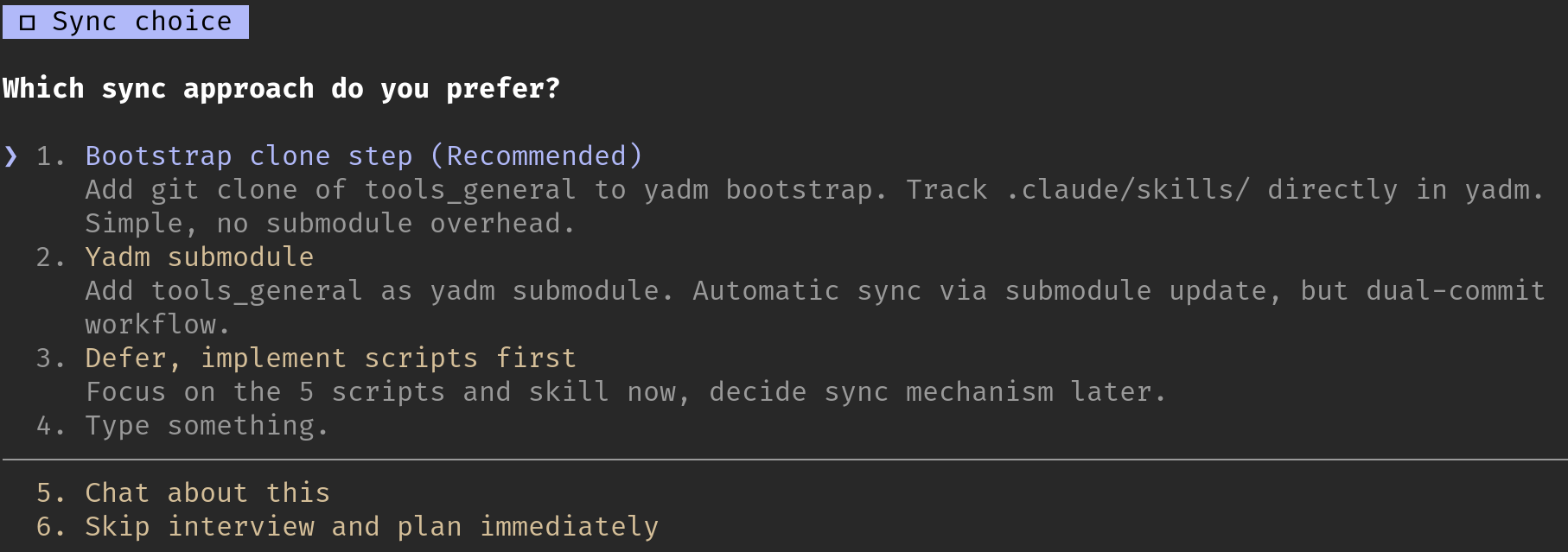 Claude Code’s planning interface presents structured choices. Note the “Type something” option that allows free-form input — this is where the most valuable questions come from.
5. Treat Reversals as Signal, Not Failure
When an AI changes its recommendation under questioning, that’s good. It means the initial recommendation was the result of shallow analysis, and the critical question forced deeper reasoning. Don’t treat this as the AI being unreliable — treat it as the planning process working correctly.
The Broader Lesson
I’ve been using AI agents for complex infrastructure and DevOps work for several months now — VPN diagnostics, meeting notes automation, cross-machine configuration management, Neovim maintenance. The pattern I keep seeing is this:
The AI is better at implementation than at architectural judgment.
It can write excellent bash scripts, create well-structured SKILL.md files, edit configs with surgical precision, and run multi-step diagnostic workflows. These are mechanical tasks where thoroughness and speed matter, and the AI excels at both.
But when it comes to choosing which approach to take, the AI defaults to pattern-matching and comprehensive-sounding solutions. It picks the option that covers the most edge cases, not the one that best fits your specific constraints. It sees that you use submodules and recommends more submodules, without asking whether the new use case is fundamentally the same as the existing ones.
This is not a criticism of the AI. It’s a recognition of where human judgment adds the most value. The planning conversation — where you push back on recommendations, force comparative analysis, and watch for reversals — is where your experience and contextual knowledge have the highest leverage.
The scripts Claude wrote for my Neovim maintenance system are excellent. I couldn’t have written them faster myself. But the decision to use bootstrap clone instead of yadm submodule — a decision that affects every future maintenance session on every machine — that required a human asking “are you sure about that?”
Conclusion
The next time an AI agent presents you with a plan, resist the urge to accept it immediately. Read it. Find the architectural choices. Ask the AI to argue for its recommendation against the alternative. If it reverses its position, you just saved yourself from the wrong architecture. If it holds firm with strong reasoning, you’ve validated the approach and can proceed with confidence.
Either way, you’ve spent two minutes on the highest-leverage activity in the entire workflow: making sure you’re building the right thing before you start building it.
The planning phase is not overhead. It’s where AI agents earn their keep.