From Idea to App: A Non-Programmer’s Guide to Building with AI
I’ve been diving into the DeepLearning.AI course “Build with Andrew”, and it gave me a profound realization. The real insight isn’t just a new way to write software—it’s that highly technical fields like web development can now be tackled by people who know absolutely nothing about coding.
In a 1990 interview, Steve Jobs famously called the computer the equivalent of a “bicycle for our minds”. He recalled reading an article, which he believed was in Scientific American, that measured the efficiency of locomotion for various species on Earth. According to Jobs, the condor used the least energy to move a certain distance, while humans came in with an unimpressive showing about a third of the way down the list. However, when they tested a human riding a bicycle, the efficiency blew the condor completely off the top of the chart.
Just as the personal computer amplified the cognitive abilities of that era, AI is the bicycle for our minds today. It exponentially amplifies our individual power to build tools, solve complex problems, and create value.
Now, everyone can become a builder and unlock potential they never imagined before. Here is a quick, personal recap of a framework from the course, and how I used it to build a working web app from scratch today.
The 5-Part Conceptual Framework
When you sit down to prompt an LLM to build something, you need to break your idea down into these five clear components:
- Goal: What you want to create.
- Input: What the users provide.
- Output: What the app should output.
- Layout: How the app should look.
- Feature: What special features to include.
The Secret: Build in Steps
The biggest mistake I used to make was trying to cram all five of these into one giant prompt. The notes from the course emphasize building in steps:
- Start simple: Begin with just your main goal, and the most important input and output.
- Test and review: Generate and test the 1st version out of the LLM before moving on.
- Add complexity later: Add more specifications about layout or additional features only after that 1st version works.
- Polish: Iterate to improve and polish the app.
- User Experience: Finally, focus on the User Experience (UX).
Real-World Example: Building the “Applause Generator”
To test this out, I decided to build a tool to help me write quick appreciation messages for my colleagues. Here is exactly how I applied the framework.
Step 1: The Core Logic (Goal, Input, Output)
I ignored colors, layouts, and animations completely for my first prompt. I just wanted the logic to work.
My Prompt:
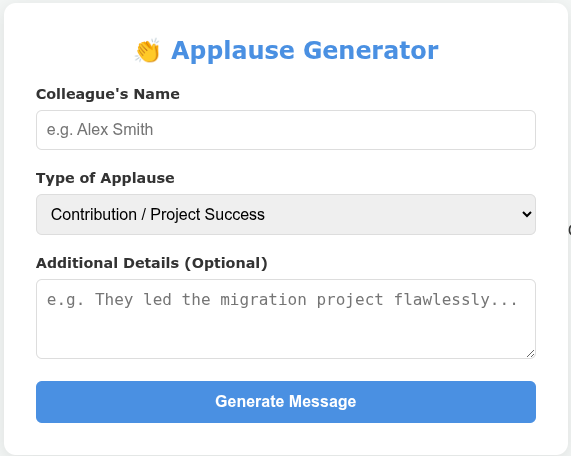
“Create a web page in a single HTML that helps me to generate the applause message to my colleague. It should have one input field for the name of the colleague, a drop down menu for type of applause… Then a bigger input field for details. The output is an applause message that appropriate for each type… Output into a dialogue box where user can edit… with a button to copy the content.”
The LLM spat out a single HTML file. I opened it in my browser, and it worked perfectly! The logic for generating the text based on the dropdown selection was solid.
Here is what the very first, bare-bones version looked like:
Step 2: Adding Layout and Features
Once I knew the core engine worked, I moved on to the next parts of the framework: Layout and Features.
My Iteration Prompt:
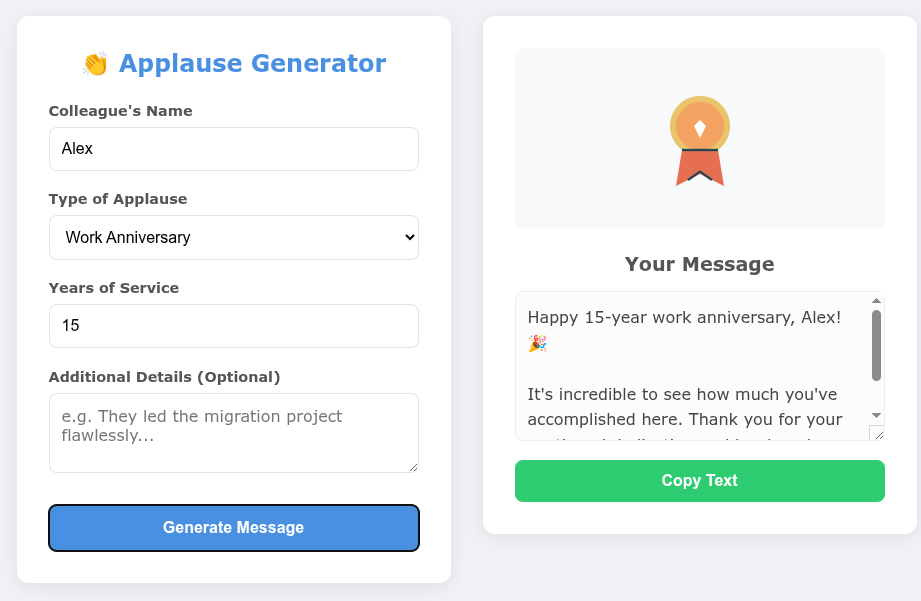
“Make the output block appear beside the input block (not a new window). There should be also a nice cartoon or plot fit the specific topic (determined by the type of applause) above the output message box.”
The LLM updated the code. Now, instead of a top-to-bottom form, it was a neat side-by-side dashboard. It even generated clever, dynamic SVG icons (like a cake for birthdays or a rising chart for promotions) that changed automatically based on the user’s input.
As you can see below, the app started to take shape with a much better layout and dynamic visuals:
Step 3: Focusing on UX and Polish
Finally, I wanted it to actually look like a modern, fun app people would enjoy using.
My Polish Prompt:
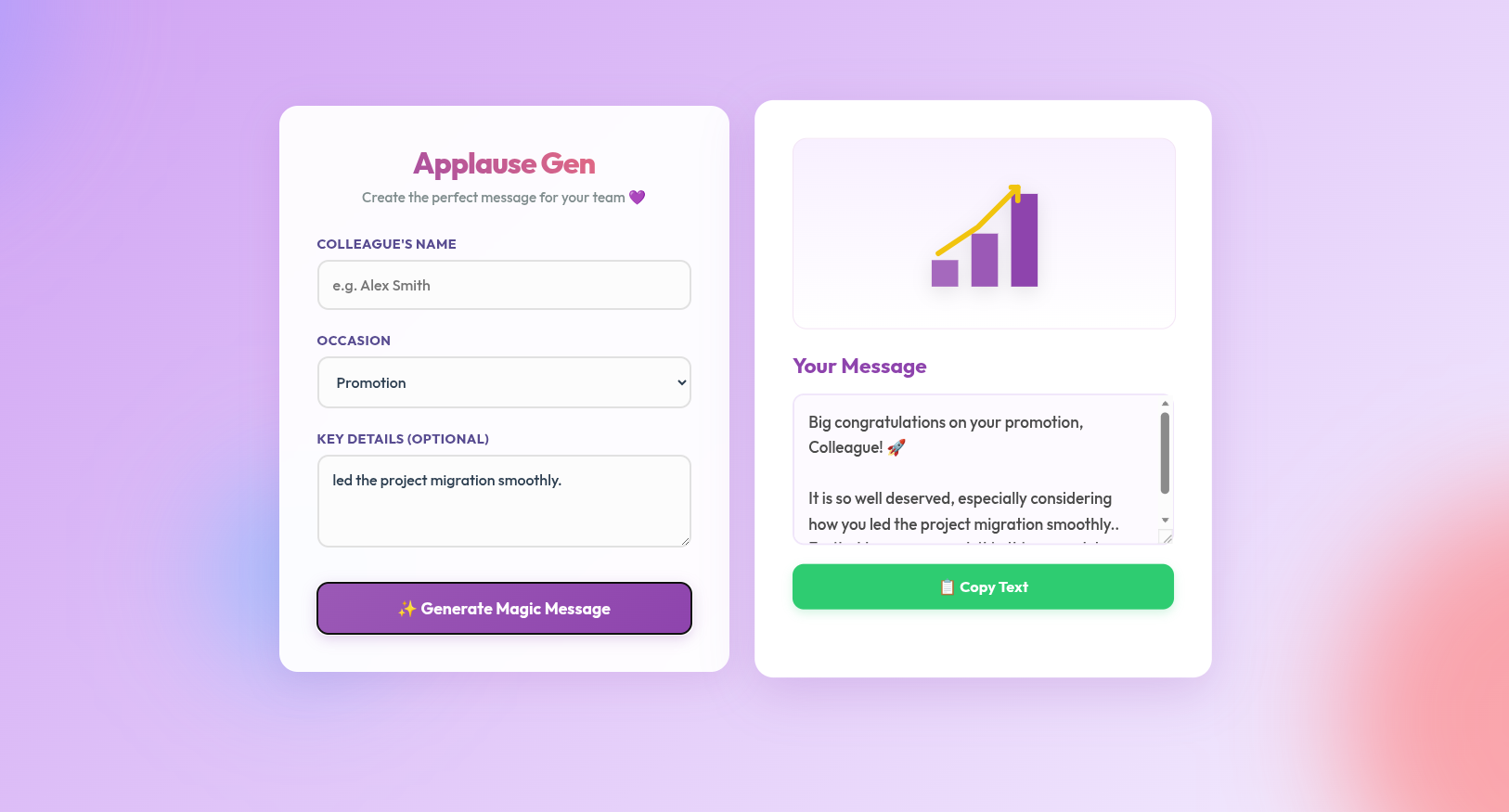
“Add decoration around the web interface and make it looks nice and interesting. Make the text font of the title and subtitles look cool and nice. Use a purple theme with nice color scheme.”
The final result was incredible. The LLM pulled in a Google Font (“Outfit”), added floating, blurred gradient blobs to the background, and refined the button hover states. It went from a structural prototype to a polished product in just three prompts.
Here is the final result. Notice how the fonts, background blobs, and button styling completely transformed the feel of the app:
Want to try it yourself? I’ve deployed the final version of the Applause Generator—give it a spin here and send some appreciation to your colleagues!
Final Thoughts
This structured approach completely removes the overwhelm of building software. By strictly defining your Goal, Input, and Output first, and saving the Layout and Features for later iterations, anyone can build highly customized tools.
Would you like to try applying this 5-part framework to another app idea you have right now?